Try it — no install
Type a port. See what's holding it.
This is the verdict Localhost Explorer gives on a real Mac — the process, who keeps it alive, and the stop command that actually works.
What you're downloading
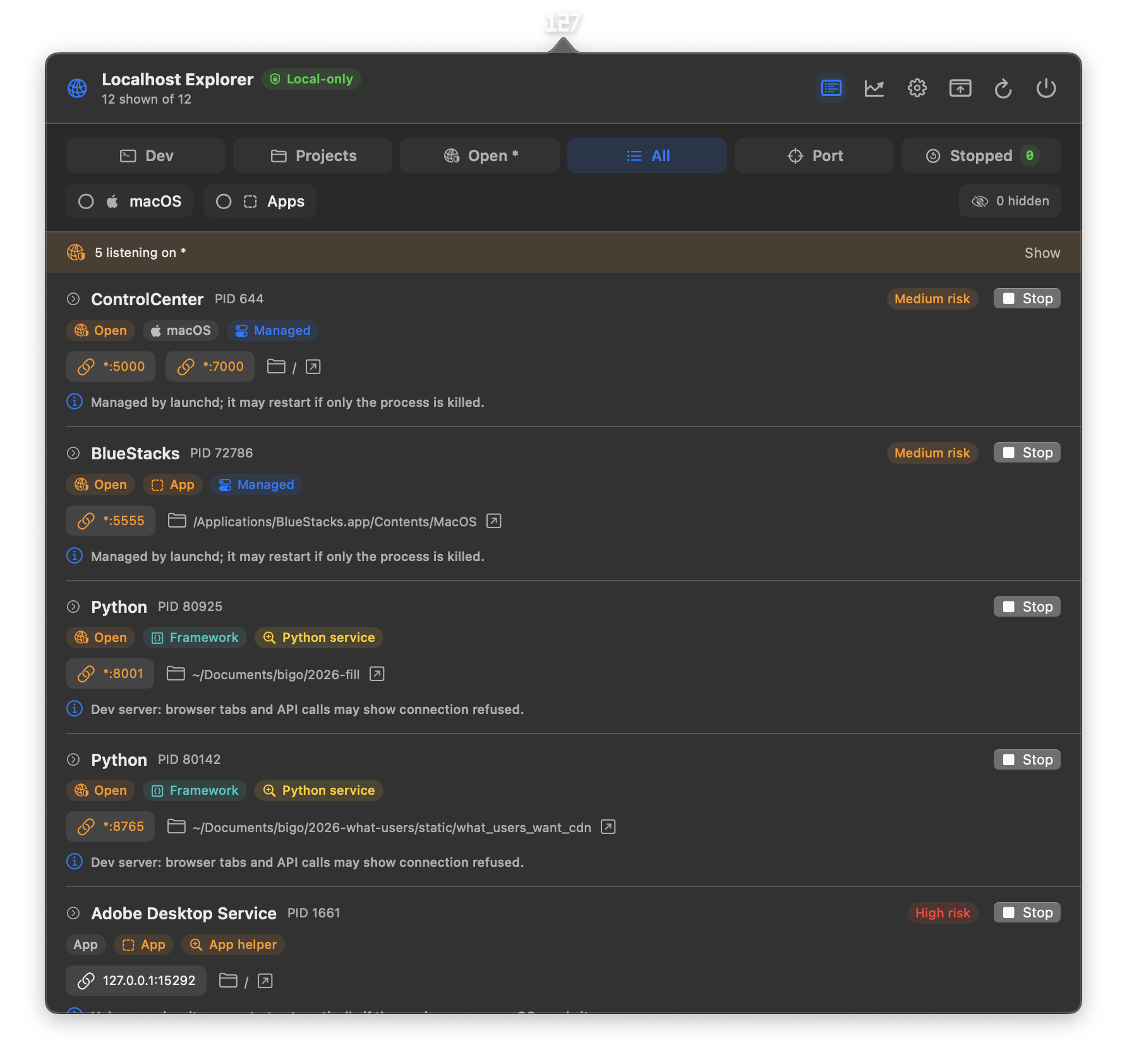
A real menu bar popover. No mockups.
This is the actual app, not a Figma render. Every row, badge, and risk pill comes straight from lsof + LE's process intelligence on a real Mac.
You've probably seen this
-
Port 3000 already in use.Yesterday's dev server never actually quit. Or VS Code's debugger grabbed it. Or both.
-
kill -9 postgres. Postgres comes back.Homebrew started it months ago and launchd is dutifully reviving it every time you blink.
-
Closed the editor. :6010 still listening.Language servers, copilots, and helper processes routinely outlive the app that started them.
-
Laptop's on fire. Everything looks fine.A forgotten emulator or dev server pinning eight cores looks like a calm little row in every tool — until something finally shows you the CPU.
The kill that doesn't kill
Port 5000 belongs to ControlCenter.
Yes, that ControlCenter — the Apple system process. It's managed by launchd, which means kill -9 645 gives you a fresh PID a few seconds later. lsof -i :5000 tells you the PID; it doesn't tell you that.
Localhost Explorer reads the launchd label, names the manager, recommends the strategy, and rates its own confidence. You decide. You don't guess.
-
lsof
ControlCenter 645 *:5000 *:7000 -
kill -9 645
(0.4s later) ControlCenter 812 *:5000 *:7000 -
Localhost Explorer
Managed by launchd · Careful terminate · 82% · use launchctl to unload
Stop strategies
Stop is a decision, not a button.
The right way to take down a listener depends on who's holding it. Localhost Explorer picks the strategy and shows you why before you commit.
-
01
Everyone's first kill
TERM
Plain dev servers. Sends
SIGTERM, warns which tabs and reloaders will break. -
02
If you ran brew install
Homebrew service
Redis, Postgres, MongoDB started by
brew services. Stops the service, not just the PID — otherwise launchd brings it back. -
03
Docker users meet this daily
Container port
When a published port maps cleanly to one Docker or OrbStack container, the container owns the lifecycle.
-
04
The one that ruins evenings
Managed by launchd
Editor language servers, Apple helpers, custom
.plistjobs. Flagged before you act so you don't keep playing whack-a-mole.
Tools
Little tools that know your localhost.
Six tools here you can only build on top of a live map of every listener on your machine — plus 90 more honest tools for ports, DNS, Docker, Homebrew, caches, clipboard, and system, sectioned by how often you'll reach for them, searchable, each showing the exact command it runs.
- Keep awake
- Open when ready
- Wait for port
- Hold port
- Restart listener
- Notify on exit
- Kill by folder
- Flush DNS
- Restart Dock
- Restart Finder
- Sleep display
Keep Mac awake
caffeinate -di
Stop your Mac from sleeping for a chunk of time.
-
Keep awake until this PID exits
caffeinate -wbound to any localhost listener. Mac stays awake exactly as long as your build, LLM, or test runner lives. Sleeps automatically when it exits. -
Open browser when port comes up
Pick a port and a path. We poll
lsof. The moment something starts listening, we fireopen http://localhost:N/. No more refreshing. -
Tell me when port frees up
Port 3000 stuck? Pick it. We notify you the second nothing's listening so you can grab it for your own service without a stale
EADDRINUSEdance. -
Hold a port
Bind a sentinel listener on 127.0.0.1 so nothing else on the system can grab the port. Release when you're ready to use it yourself.
-
Restart a managed listener
We know which listeners are
brew servicesor Docker containers. One click bounces them via their real owner — nokill -9surprises. -
Stop everything in this folder
Pick a project directory. We list every listener whose working directory lives under it, then send
SIGTERMto all of them in one go. End of dev day, one click.
New to this?
Start with the 7-lesson field guide.
If words like launchd, SIGTERM, or brew services are new, the Academy walks you from 127.0.0.1 to source-aware lifecycle management.
- 01Localhost
- 02Ports
- 03Listeners
- 04Wildcards
- 05PIDs
- 06Folders
- 07Owners
Anatomy of a row
Every row answers four questions.
One glance, four answers. The numbered callouts map directly to what you read in the popover — same order, same vocabulary.
-
1
Process nameThe binary holding the port.
-
2
PIDStable while the process lives.
-
3
ProfileRedis, Vite, Ollama — what kind of thing it is.
-
4
Managerlaunchd, brew, Docker — who restarts it.
-
5
EndpointLoopback, IPv6, or wildcard.
- What is it?
- Redis · PID 85,899 · started by Homebrew.
- Where does it live?
/opt/homebrew/var/db/redis- Where is it listening?
127.0.0.1:6379· loopback only- If I stop it?
brew services stop redis— otherwise launchd revives it.
Features
The menu bar version of lsof with a memory.
- Free a port. Type
3000, see the owner, pick the safest action. - Group by project. Forgotten servers stop being invisible.
- Wildcard warnings. Anything bound to
0.0.0.0is called out — it might be reachable beyond your Mac. - Process profiles. Knows Redis, Postgres, Mongo, Ollama, Node, Python, common editors and helpers.
- See what's hot. Live CPU and memory on every listener — a process pinning your cores is flagged red before it cooks your battery.
- Three kinds of quiet. Pick a row style: Calm, Mono (every port and PID in monospace), or Signal — greyscale except risk and hot CPU, so the only loud row is the one that needs you.
- Ten themes. MS-DOS, System 7, Game Boy, phosphor and amber CRTs, e-ink Paper, Blueprint, Dracula, Nord, Vaporwave — your ports, your era.
- 96 tools, searchable. Kill a port, dig a domain, prune Docker, lock the keyboard to clean it, ask the rubber duck — each shows the exact command it runs, none of them need sudo.
- Restart hints. The right
brew services startorlaunchctlcommand, copy-ready. - Tunnels say what they are. A
kubectl port-forwardstops hiding as “kubectl” — the row names the service, the ports, and the context. Same forcloudflared. The word prod on a row is a safety feature. - Pinned ports. Star a listener and its port pins to the top — keyed by port, not PID, so your favorite survives every restart of whatever serves it.
- Keyboard everything. A global hotkey to summon the app (off by default — your Mac, your shortcuts), then ↑↓ to move,
oto open,xto stop, Esc to collapse. - Links that know they're HTTPS. Every endpoint link checks whether the listener speaks TLS before writing the scheme — no more
http://against a local cert. - Your cadence. Scan refresh is a setting — Fast, Normal, Relaxed, or manual-only — and every per-row control (Stop, star, CPU) can be switched off in Row Display.
- Adjustable popover. Compact, default, roomy, expanded — same data, your scroll preference.
Free & open source · MIT
If you live in the terminal, le is yours. Free.
The same engine as the app — it knows who owns a port and which stop actually sticks — as a single static binary for macOS and Linux, including servers over SSH. MIT licensed, no account, no telemetry.
$ le
PORT   PID    WHAT               DIR                RISK    OWNER      STOP WITH
3000   38814  juice-shop         ~/code/juice-shop  medium  container  docker stop juice-shop
8001   43138  Django dev server  ~/code/api         low     terminal   TERM
27017  1183   MongoDB            /opt/homebrew/var  high    homebrew   brew services stop mongodb-community
Install
brew install alikatgh/tap/leMan pages and shell completions included. Or grab a prebuilt binary — macOS and Linux, amd64 and arm64, provenance-attested.
Use
le                # live TUI of everything listening
le list node      # one-shot table (--json for scripts)
le stop 3000      # TERM / brew / docker / launchctl
le stop --dir . -n # preview stopping a project's servers
le hold 3000      # squat a port so nothing grabs it
le ready 5173 -t 30s && open http://localhost:5173
le is free forever — that's the point. If it earns a place in your shell, the $5 app is how you support the work.
Launch license
$5. One Mac. Yours to keep.
Secure checkout is being set up — email to buy today and I'll send your download link. No account, no subscription, no analytics. Every update included, and a 14-day refund if it's not for you.
One-time purchase, one Mac. See the license, warranty & refund policy.
 Localhost
Explorer
- 1. Open the DMG, drag the app to Applications.
- 2. Launch it. The icon lives in the menu bar.
- 3. Click before you kill.
Questions a developer would ask.
- Does it upload my command lines anywhere?
- No. Your command lines, ports, folders, and scan results never leave the Mac — no account, no telemetry, no analytics. The app only touches the network to check for updates, and when you run a network tool yourself (ping, curl, or "my public IP").
- Why isn't it on the App Store?
- The whole point is reading other processes' ports, folders, and managers. Sandboxing makes that impossible to do well.
- A process came back after I clicked Stop. Why?
- Something else owns its lifecycle — launchd, Homebrew, an editor, a container manager. Localhost Explorer flags those before you act and recommends the right path; sometimes you have to take it.
- Intel Macs? macOS 12?
- Apple Silicon and macOS 13+ for now. Earlier targets aren't ruled out, but they're not the focus.