Free & open source · MIT
le — Localhost Explorer for the terminal.
A fast, keyboard-driven TUI for seeing what's listening on your machine and stopping it the right way. Single static binary, macOS and Linux — including servers over SSH. No account, no telemetry.
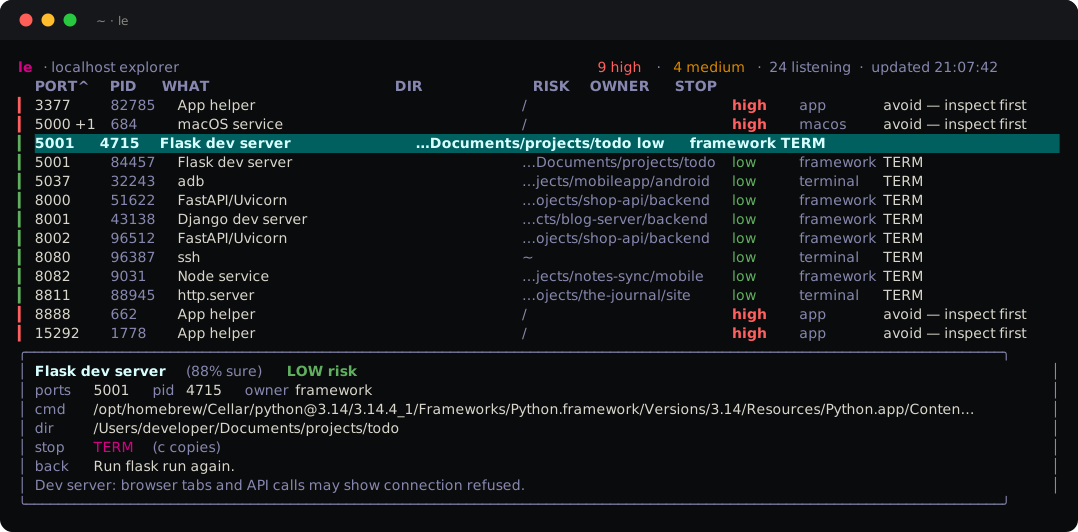
lsof -i :3000 gives you a PID. It doesn't tell you the PID belongs to a Homebrew service — or a launchd agent with KeepAlive — that respawns the moment you kill -9 it. le names the owner and picks the stop that actually works: TERM for plain processes, brew services stop for Homebrew, docker stop for containers, launchctl bootout for launchd agents — and when it can't confirm what a process is, it refuses to auto-kill and names the supervisor so you can decide.
Install
One line, or one tarball.
One line, any Mac or Linux box
curl -fsSL https://localhostexplorer.com/install.sh | shNo Homebrew, no Go — downloads the latest release, verifies its checksum, installs it. Distrust curl | sh? Sensible: read the script — it's just over a hundred lines and refuses on any mismatch.
Homebrew (macOS)
brew install alikatgh/tap/leMan pages and shell completions included. brew install alikatgh/tap/localhostexplorer works too.
Binaries, by hand (macOS + Linux)
tar -xzf le_*.tar.gz
sudo mv le /usr/local/bin/
amd64 and arm64 tarballs on the Releases page, checksummed, with a signed build-provenance attestation: gh attestation verify le_*.tar.gz --repo alikatgh/le-cli. Needs only lsof and ps — preinstalled on macOS, available on every Linux.
Commands
A verb for everything, no ceremony.
See & stop
le              # live TUI (default)
le list         # one-shot table and exit
le list node    # …filtered
le list --json  # …for scripts / jq
le stop 3000    # by port (or PID)
le stop --dir . # everything this project spun up
le stop --dir . -n # …dry run first
Hold & wait
le hold 3000    # squat a port (Ctrl-C frees)
le wait 5432    # block until a port frees up
le ready 8080   # block until something listens
le ready 8080 -t 30s # …bounded, for CI
le ready 5173 && open http://localhost:5173 opens the browser the moment Vite is up. le wait 5432 && pg_ctl start restarts Postgres once the port clears. Every command has --help.
Watch & tunnel
le forward svc/api 8080:80 # port-forward that
                           # reconnects itself
le check 3000   # HTTP health: status + latency
le qr 3000      # open it on your phone (LAN QR)
le watch 5173   # notify when it exits
le watch-all    # live +/- feed of listeners
le open 8080    # browser, the moment it's up
le forward runs the kubectl port-forward you'd have typed — printed, not hidden — and supervises it: pod restarts, rollouts, idle drops all get an automatic, logged reconnect with backoff. Ctrl-C stops both, no orphan squatting the port. New in v0.1.16. Why tunnels needed naming →
The TUI
Keyboard all the way down.
Navigate
j / k    # move down / up
g / G    # top / bottom
/        # filter: port, name, folder
1 – 7    # sort by any column
z        # group by owner — ⏎ folds one,
         # Z folds all
r        # refresh now (auto every 3s)
Act
⏎        # open the row's own actions —
         # j/k pick a field, ⏎ runs it
x        # stop the selection (asks first)
o        # open the port (http/https auto)
f        # pin the port to the top (*) —
         # survives restarts, sorts, sessions
c        # copy the stop command — OSC 52,
         # so it works over SSH
?        # help
That c key matters on servers: OSC 52 is the terminal's own clipboard channel, so the stop command lands on your clipboard even when le runs on a box you SSH'd into. More on the SSH story →
⏎ opens the selected row's own actions in the detail pane — the specific port to open (not just the first one), the binary as distinct from the folder, the stop. New in v0.1.22. Why it took three releases →
Six themes: default, light, nord, dracula, solarized, and mono (colorblind-friendly — no risk colors, bold still marks high). Press t to cycle live, or set theme = nord in ~/.config/le/config to make it stick. The current theme, refresh cadence, and config path live in the ? overlay's settings section.
Why trust it with a kill signal
Read the code that decides.
Every stop re-verifies the PID's start time first, so a recycled PID never gets a signal meant for something else — and a launchd bootout re-verifies the label still maps to the scanned PID, because labels can be re-bootstrapped onto a different program between scan and stop. The ps/lsof parsers are fuzzed nightly in CI. Three adversarial review rounds found eighteen real bugs before they found you — the full reports, refuted candidates included, ship in the repo at docs/audits/.
le is MIT and free forever — that's the point. If it earns a place in your shell, the $5 menu-bar app is how you support the work.